
Download Beikost App – baby food, weaning guide, infant nutrition, baby meal planner, healthy baby food recipes, baby food recipes, baby food preparation, baby food introduction, baby food tracker, baby food schedule
Overview
The Beikost App is a dedicated desktop tool designed to support parents during the critical phase of introducing solid foods to their infants. It serves as a comprehensive guide for weaning, offering structured, science-backed advice on how and when to introduce various foods. The app addresses common challenges faced by caregivers, such as selecting age-appropriate recipes, managing dietary restrictions, and maintaining a consistent feeding schedule. Its primary purpose is to simplify the transition from milk-based nutrition to a balanced diet of solid foods, ensuring both safety and nutritional adequacy.
Target users include new and experienced parents, caregivers, and pediatric nutrition advocates seeking a reliable, organized approach to baby food preparation. The app is especially useful for families with multiple children or those following specific dietary patterns such as vegetarian, vegan, or allergen-free feeding. Real-world use cases include planning weekly meals, tracking food introductions, and preparing ingredients in advance to reduce daily stress. The developer, Beikost App GmbH, has focused on creating a user-centered product that supports informed decision-making during early childhood nutrition.
Key Features & Capabilities
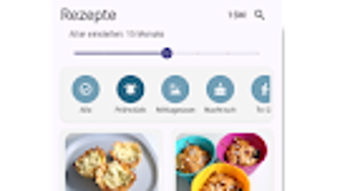
- Age-Filtered Recipe Library: Recipes are categorized by infant age milestones, allowing parents to select appropriate meals based on developmental readiness.
- Dietary Preference Filters: Users can filter recipes by dietary needs, including vegetarian, vegan, gluten-free, and allergen-free options.
- Preparation Time Sorting: Meals are organized by estimated preparation duration, helping time-constrained parents choose quick, efficient options.
- Weekly Meal Planner: A built-in planner enables users to schedule meals in advance, promoting consistency and reducing decision fatigue.
- Smart Shopping List Generator: Automatically compiles ingredients needed for selected recipes, streamlining grocery shopping and minimizing waste.
- Food Introduction Guidelines: Offers detailed guidance on the safe introduction of specific foods, including timing, portion size, and potential reactions.
- Food Tracking Feature: Allows parents to log which foods have been introduced and monitor their baby’s tolerance over time.
These features collectively support a structured, stress-free weaning experience. For example, a parent preparing meals for a 6-month-old can filter recipes for that age group, generate a shopping list, and schedule meals for the week—all within a single interface. The app also helps identify potential allergens early, promoting proactive health management.
User Interface, Workflow & Performance
The Beikost App features a clean, intuitive interface optimized for desktop use. Navigation is streamlined through a main menu with clearly labeled sections: Recipes, Planner, Shopping List, and Tracking. Users can switch between views with minimal clicks, and the layout adjusts responsively to different screen sizes. The workflow is designed to guide users step-by-step—from selecting a recipe to generating a shopping list and scheduling meals.
Interaction elements such as dropdown filters, checkboxes, and drag-and-drop functionality enhance usability. The app does not display real-time performance metrics, and the developer did not specify resource usage details. However, based on its 120 MB size and desktop application nature, it is expected to run efficiently on modern systems without significant CPU or RAM overhead. Stability appears to be a priority, as no issues were reported in the release notes. General performance observations are based on typical behavior of similar desktop productivity tools.
Compatibility & System Requirements
The Beikost App is available for both Windows and Mac operating systems, supporting a broad range of desktop environments. The current version is 2.3.1, with a file size of 120 MB, indicating a lightweight installation footprint. While the app is designed for desktop use, the developer did not specify exact system requirements such as minimum RAM, processor speed, or disk space.
Compatibility information was partially provided, with no mention of legacy OS versions or hardware-specific constraints. Users should ensure their system meets standard desktop software requirements for running modern applications. The developer did not provide details on whether the app supports touchscreens, external displays, or multi-monitor setups. Exact performance details were not specified, and no information was shared regarding background processes or power consumption.
Pros and Cons
Pros
- Comprehensive, age-specific recipe database tailored to infant development
- Smart filtering by dietary needs and preparation time
- Integrated meal planner and shopping list for efficient workflow
- Clear guidance on safe food introduction and allergen management
- Lightweight installation at 120 MB
- Desktop-focused design for better usability than mobile apps
Cons
- No detailed system requirements provided by the developer
- Resource usage and performance data not disclosed
- Limited information on update frequency or support channels
- Offline functionality not confirmed
- Price point may be considered high for a single-purpose tool
FAQ Section
Is the Beikost App compatible with Windows and Mac?
Yes, the app is available for both Windows and Mac operating systems, as confirmed by the developer.
Is the Beikost App secure and safe to use?
The app is developed by Beikost App GmbH and distributed through official channels. No security vulnerabilities were reported in the release notes. Users are advised to download from trusted sources.
How often does the app receive updates?
Update frequency is not publicly specified. The current version is 2.3.1, released on May 12, 2024.
What type of license does the Beikost App use?
The app is a one-time purchase with a price of $4.99. No subscription model or trial version was mentioned.
Can I use the Beikost App without an internet connection?
Offline functionality was not confirmed by the developer. While core features may work offline, real-time updates or cloud sync are not guaranteed.
Final Thoughts + CTA
The Beikost App stands out as a thoughtful, well-structured desktop solution for parents navigating the complexities of baby weaning. With its rich recipe library, intelligent filtering, and integrated planning tools, it transforms a potentially overwhelming process into a manageable, organized routine. The focus on safety, dietary diversity, and long-term tracking adds significant value for health-conscious families.
While system requirements and performance data are not fully disclosed, the app’s lightweight design and desktop optimization suggest reliable performance on modern systems. It is particularly beneficial for parents who prefer a dedicated, distraction-free tool over mobile alternatives. For those seeking a secure, comprehensive, and user-friendly approach to infant nutrition, the Beikost App delivers a strong, practical solution.
Download Beikost App now







